Laptop Maintenance Checklist: Keep Your Device Running Smooth
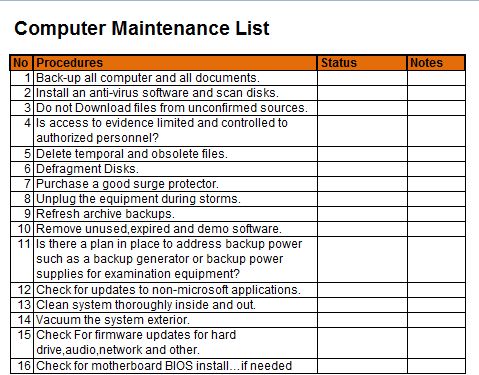
Regular laptop maintenance is vital for longevity, performance, and preventing costly repairs. Staying on top of routine upkeep can significantly extend your device's lifespan. So, let's delve into an extensive laptop maintenance checklist to ensure your tech companion remains in tip-top shape.
First, it's essential to understand that laptop maintenance isn't just about software tweaks; it involve hardware upkeep too. By following a comprehensive checklist, you'll ensure your laptop remains an efficient, reliable tool for years to come.
Messy Environments & Physical Care
Maintaining a clean workspace directly impacts your laptop's life. Here's how to safeguard your hardware from dust and debris:


Regular Dust Removal
Dust can accumulate in air vents, fans, and keyboard, blocking airflow and reducing efficiency. Use a compressed air canister or vaccum designed for electronics to dislodge dust every couple of months.
Ensure to hold the canister upright, so no liquid Slade into your laptop. Additionally, clean around the keyboard, ports, and ventilation grills to keep them unclogged and pristine.


Proper Storage & Handling
When not in use, store your laptop in a cool, dry place away from direct sunlight. Avoid stacking heavy objects on top, as they can damage the casing and internal components. When traveling, use a protective sleeve or bag to prevent scratches.
Be cautious when handling your laptop. Avoid touching the screen with greasy or dirty fingers, and be gentle with the lid and ports to prevent damage.
Software Upkeep & Optimization
Maintaining a smooth-running laptop involves regular software tweaks. Here's how to boost performance and security:


Operating System Updates
Regularly update your OS to ensure you have the latest security patches, bug fixes, and enhancements. Skip this step at your peril, as outdated software exposes your laptop to viruses and malware.
Most modern operating systems automatically install updates. However, double-check by navigating to your OS's settings or control panel, then select 'Update & Security' or a similar option to manually install missing updates.
Uninstall Unnecessary Software
Removing unused programs improves overall performance by freeing up memory and storage. Use the Add or Remove Programs feature in your OS's control panel to clear surplus apps. Additionally, clean up the Startup menu to disable background programs that launch at boot.

Be cautious when uninstalling programs, as some critical components might be required for your laptop's function. If unsure, seek professional advice.
Regular Malware Scans
Even with robust security measures, your laptop may still encounter malware. Run regular scans using comprehensive antivirus/anti-malware software like Bitdefender, Norton, or McAfee to weed out threats before they multiply.
Schedule automatic daily scans and weekly deep scans to maintain ironclad security. Stay updated with the latest protection against emerging threats.
Optimize Hard Drive Performance
Over time, hard drives can become fragmented and cluttered, impacting performance. Use built-in disk cleanup tools to remove temporary files, cached data, and unnecessary files.
Additionally, consider using specialized software to defragment your hard drive, improving read/write speeds. For those with SSDs, keep TRIM enabled to maintain optimal performance.
Proper laptop maintenance shouldn't be a chore. With a simple checklist and regular upkeep, your laptop will repay you with years of smooth, efficient service. Don't forget to schedule periodic professional checkups to address any underlying issues that may require expert attention.
Related Articles

2018 Isuzu NPR Maintenance Schedule: Keep Your Truck Running Smooth in 2023
The 2018 Isuzu NPR is a versatile and durable truck designed to handle various commercial and industrial applications. To ensure peak performance and...

Isuzu Maintenance Jobs: Keep Your Truck Running Smooth
Isuzu vehicles, renowned for their durability and reliability, require regular maintenance to ensure they perform at their best and have a long lifespan...

Volvo XC60 Maintenance Schedule: Keep Your SUV Running Smooth
Volvo's commitment to safety, comfort, and sustainability is evident in the XC60, their successful mid-size SUV. To ensure you get the most out of your XC60...

Truck Maintenance Schedules: Keep Your Fleet Running Smooth
Regular truck maintenance is not just a tedious chore, but a critical aspect of ensuring the longevity, safety, and efficiency of your vehicle. A...

2020 Dodge Ram Maintenance Schedule: Keep Your Truck Running Smooth
Owning a 2020 Dodge Ram is an experience that combines power, comfort, and durability. To ensure your truck stays in top condition and performs consistently...

Dodge Ram 2025 Maintenance Schedule: Keep Your Truck Running Smooth
The year 2025 promises exciting new features and robust engineering in the automotive industry, with Dodge Ram at the forefront. As a proud owner of a 2025...