Summer Program Registration Form Template
As the school year winds down and temperatures start to rise, it's time to start thinking about summer activities. For many educators and program coordinators, this means finalizing summer program registration forms. But where to start? Here's a comprehensive guide to creating an effective summer program registration form template, complete with expert tips and real-world examples.
Summer program registration forms play a crucial role in organizing and planning activities, managing participants, and ensuring safety. A well-crafted form not only collects essential information but also provides a positive first impression of your program. Let's dive into the key elements of a summer program registration form template.
Essential Form Components
The first step in creating an effective summer program registration form is to identify the fundamental components. These include personal and contact information, emergency contact details, medical history, and consent forms.

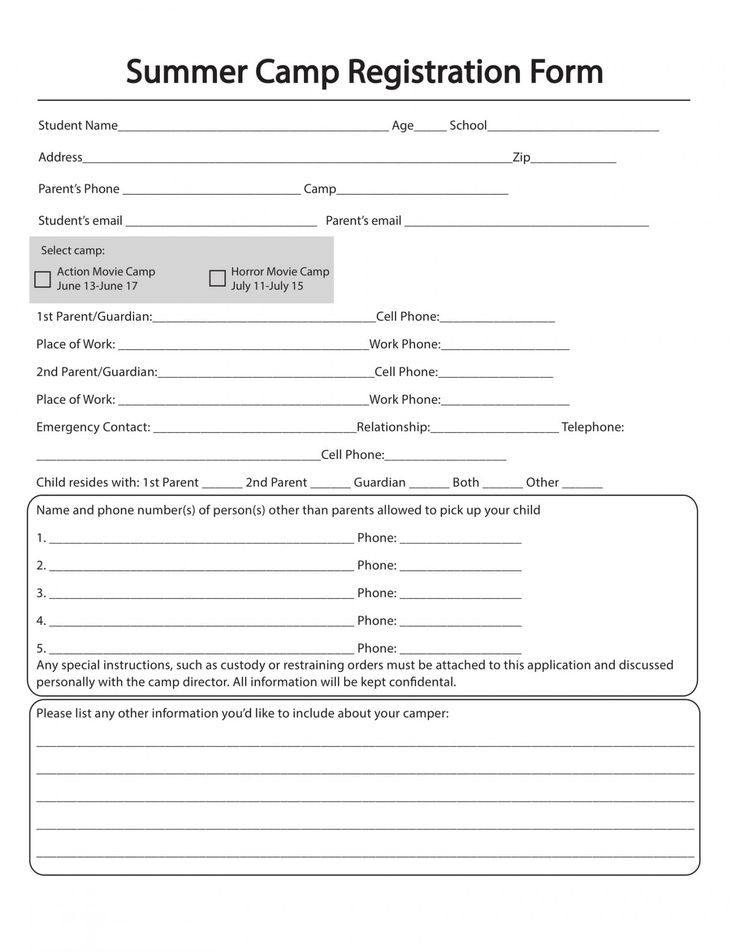

However, it's essential to strike a balance between gathering necessary information and overwhelming participants with an extensive form. Consider using conditional logic (where relevant) to show or hide sections based on participants' responses, making the form more manageable.
Personal and Contact Information
Collecting participant's full name, age, gender, and contact information (address, phone number, email) helps verify their identity and ensure they receive important updates about the program. Using clearly labeled fields and intuitive form design will streamline data collection.


For young participants, consider including a guardian's signature and contact information, as they may need to be reached during the program. Here's an example: - Full Name (First, Middle, Last) - Age - Gender - Address (Street, City, State, Zip) - Phone Number - Email Address - Guardian's Signature (if applicable) - Guardian's Contact Information (if applicable)
Emergency Contact Details
Emergency contact details are crucial for ensuring the participant's safety. Request the contact information of at least two emergency contacts, along with their relationship to the participant and preferred contact method.
Here's an example of emergency contact information fields: - Emergency Contact 1 Name - Relation to Participant - Phone Number - Preferred Contact Method (Home, Mobile, Work) - Emergency Contact 2 Name - Relation to Participant - Phone Number - Preferred Contact Method (Home, Mobile, Work)


Medical History and Consent Forms
Collecting medical history and obtaining necessary consents are vital for ensuring participants' safety and well-being. Clearly outline the purpose of each section and conform to relevant privacy laws and regulations.
Some essential medical history and consent form sections include: - Medical Conditions - Allergies - Medications (prescription and non-prescription) - Immunization Records - Consent for Medical Treatment - Consent for Photography and Video - Code of Conduct Agreement - Liability Waiver
Program-Specific Information
After collecting general information, delve into program-specific details to tailor each participant's experience. These sections may include selected activities, dietary restrictions, t-shirt size, and payment information.
Remember to consider accessibility when designing your form. Use descriptive labels, provide tooltips, and make the form compatible with screen readers to accommodate all participants.
Selected Activities and Availability
Ask participants to choose their desired activities, specify their availability, and indicate their commitment level. This information helps streamline scheduling and maximize each participant's involvement in the program.
Example fields include: - Preferred Activities (checkbox or multiple-choice) - Availability (calendar or date range) - Commitment Level (e.g., low, medium, high) - Special Requests or Accommodations
Payment and Scholarship Information
Collect payment details securely and consider offering scholarship options to make the program accessible to everyone. Be sure to explain any associated fees, discounts, or deadlines clearly.
Here's an example of payment information fields: - Program Fee (with clear explanation of any additional costs) - Payment Method (credit card, e-check, etc.) - Discount or Scholarship Application (if applicable) - Billing Address (if different from participant's address) - Payment Due Date and Return Policy
Creating an effective summer program registration form template involves balancing the need for essential information with a user-friendly design. By following best practices and tailoring the form to your program's unique needs, you'll provide a seamless registration experience for all participants. Don't forget to test your form thoroughly and gather feedback from users to make continuous improvements. Here's to a successful summer program registration season!
Related Articles
Program Registration Form
A program registration form is a crucial component of any event planning process, enabling organizers to gather essential information about participants and...

Motor Vehicle Accident Form Template
Following a motor vehicle accident can be a disorienting experience, but completing a thorough accident form is crucial for insurance claims, legal purposes...

Black History Month Program Template
Embarking on a journey to celebrate and educate during Black History Month requires a well-structured, inclusive, and engaging program. A comprehensive program...

Waiver Template Form
A waiver template form is a crucial document used to discharge individuals or entities from liability, releasing them from any potential claims or lawsuits...

Tax Form Waiver Letter Request Template
A tax form waiver letter is a crucial document that allows individuals or businesses to request a waiver from filing specific tax forms. This letter...

Employee Referral Incentive Program Template
Employee referral incentive programs can be a powerful tool for attracting top talent, fostering employee engagement, and boosting retention rates. By...