WordPress Gutenberg Blocks List
Gutenberg, introduced in WordPress 5.0, revolutionized content editing with its block-based system, allowing users to create and manage content more intuitively. It transformed the once monolithic content editing field into distinct, manageable segments called blocks. Let's delve into the diverse world of Gutenberg blocks.
Gutenberg's block editor offers a plethora of blocks, each serving a unique purpose in web page creation. These blocks range from simple text formats to complex multimedia and layout tools. They fall under various categories, enabling users to design, style, and structure their content effortlessly.
Core Gutenberg Blocks
The WordPress core comes with a delightful assortment of blocks, ready to use right out of the box. These blocks cater to the most common content creation needs.


Some of the core blocks include Paragraph, Headings (H1 to H6), List (bulleted and numbered), Image, Video, and Gallery blocks. They also offer structural elements like Columns, Group, and Media & Text,} and layout elements like Button, Separator, and Preformatted text.
Text-Based Blocks
Text-based blocks form the backbone of your content. They include the versatile Paragraph block for normal text, and Headings block for titling sections of your posts or pages.


Additionally, Quote, Code, and Preformatted blocks help users emphasize text, display code snippets, and preserve line breaks respectively.
Media Blocks
Gutenberg offers robust blocks for integrating multimedia into your content. The Image block lets you upload, align, and style images. The Video block supports embeds from popular sites like YouTube and Vimeo.
The Gallery block allows users to create image galleries, while the Audio block supports audio files. For more complex media, consider the Embed block, supporting over 30 platforms like Twitter, Spotify, and SoundCloud.




Custom and Third-Party Blocks
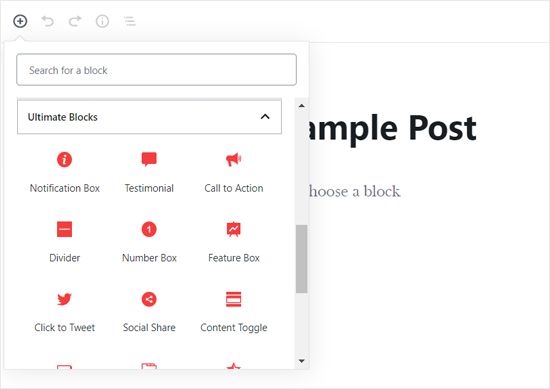
Besides core blocks, developers can create custom blocks or third-party plugins can add new blocks, unlocking endless customization options.
These blocks might include advanced layout options, unique interactivity, or specialized functionality like contact forms, social media feeds, or pricing tables, thus extending the capabilities of your WordPress block editor.
Customization Blocks
When built with the Block Editor API, custom blocks typically fall into the category of Customization blocks. These blocks often provide advanced styling, like custom colors, fonts, shapes, or animations.

Examples include the Block Styles block, offering custom styles for the cover, button, and divider blocks, and the Block应该 alignment block, aligning blocks both vertically and horizontally.
Layout Blocks
Layout blocks like Columns, Group, and Media & Text help users structure and divide their content into columns, full-width sections, or media-rich layouts.
The Columns block lets users create responsive column layouts, while Group allows grouping blocks for Romance, and Media & Text combines text with media for stunning layouts.
Embracing the vast universe of Gutenberg blocks opens up a plethora of creative possibilities in your content creation journey. Happy block exploring!
Related Articles

Create Custom Blocks in WordPress
Creating a custom block in WordPress is an excellent way to add unique functionality and design to your website. By learning how to develop custom blocks, you...

WordPress Custom Block for Gutenberg: Seize Control
WordPress's block editor, Gutenberg, revolutionized content creation with its draggable interface and customizable content blocks. At the heart of this...

Coin Collection List Australia
Coin collecting, a hobby that transcends boundaries and unites enthusiasts worldwide, holds a significant position in Australia's cultural landscape. The...

Karachi Sponsorship Contact List
Embarking on a quest to find professional organizations or individuals for sponsorship deals in Karachi? You're in the right place. In this SEO-optimized...

Walk of Fame Philippines 2023: Complete Honoree List
The Walk of Fame Philippines, an homage to local and international celebrities who have made significant contributions to the entertainment industry, is set to...

Paper Blind Bag Ideas: 30+ Unique & Creative List
In the bustling world of party planning and gift-giving, the humble paper bag transforms into a versatile and eco-friendly container, perfect for housing...